












Tell me what I’m looking at
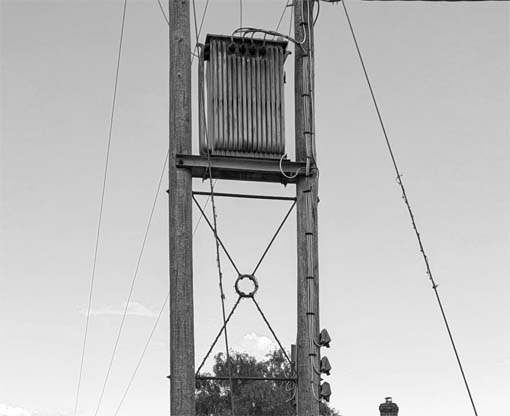
The thing above is a transformer, I guess. Above that (not pictured) are three insulators with wires. But I’m interested in the thing in the middle – the X shape with the ring in the center. It’s made of metal. If it’s ornamental, it isn’t very and if it’s functional, I can’t think what the function is. Structural? Like, bracing?
As I was typing this, a squirrel climbed down our cobnut tree and began pinching cobnuts. We do not – and I can’t emphasize this enough – have squirrels in this part of Sussex. I’ve seen them in other, more wooded parts (mostly squashed in the road), but we’re an area of rolling sheep fields and a few scraggly thorn trees. We do NOT have squirrels.
Cheeky bastard. Now we know where our nuts went this year.
August 31, 2026 — 6:41 pm
Comments: 8
Memento mori Friday
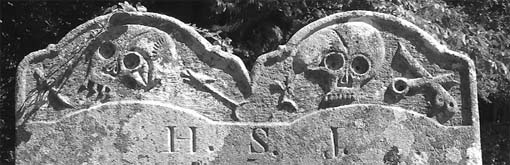
Okay, I made that up. Memento mori Friday isn’t a thing. Google Pictures showed me this snapshot as a seven years ago today… thing and I thought it was cool enough to post. It’s the stone for Lawrence Day and Joane his Wife who died in 1676. I have no idea where it was.
In the prior thread, Rich Rostrom has a burning question about the Dead Pool. Please spend the weekend arguing about it.
Have a good one!
August 28, 2026 — 6:18 pm
Comments: 8
The dumbest place on the internet

Man, I used to think Youtube comments were the dumbest posts on the internet, but Nextdoor takes the biscuit. I get notification of new posts and I know clicking them will be an utter waste of time, but I do it anyway.
It’s all I lost my cat, yay, my cat came home again and Evri has delivered my package to somebody else. That last is particularly aggrieving because I’m waiting for a shipment from Evri and for a week my tracking number has come back “We’re expecting your parcel to arrive with us soon.”
Plus, not a lot goes on around here, so it’s constantly showing me news items from “my village” that are, in fact, from a town 50 miles away. Do you have Nextdoor in the States or is it a limey thing?
Anyway, we’re going to the moving pictures tonight, so I have to go take a bath.
August 27, 2026 — 2:53 pm
Comments: 11
Well, do you feel safer?
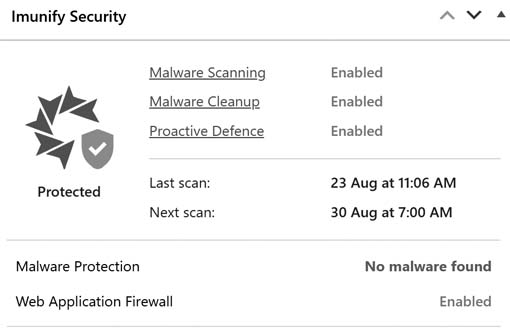
This appeared simultaneously with my most recent WordPress upgrade. Search tells me it isn’t a WordPress plugin, though, it’s something my host platforms on its server. I’m not sure how it applies – users can’t upload things and I’m not likely to upload malware myself. @Grok says it’s a good thing and not to sweat it. shrug.jpg
If you’d asked me, I’d have said Dolly Parton was a lot older than 80 and Tim Curry was a lot younger, but there we are. Things are moving.
August 26, 2026 — 6:15 pm
Comments: 4
Waifs and strays
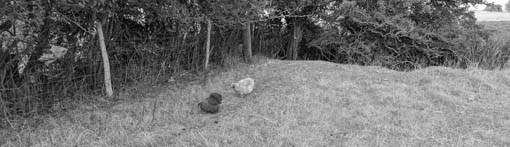
Keep chickens, they said. It’ll be relaxing, they said.
The girls (but not Sam) somehow found a way into the sheep field next door and couldn’t remember the way back. They were calling to each other on either side of the hedge. I went to retrieve them and found things have grown up a whole, whole lot since the last time I went chicken fishing.
Bad things happen on the wrong side of the fence. We call it Llama Field because I wanted to buy it and put a pair of llamas on it, but it was not to be. There be foxes.
As you might have foreseen, after I got gloves and some clippers and got myself snarled up in the bramble, they suddenly found their way back through the fence. But it’s clear that when the cold weather comes (and it’s on the way), I’m going to have to give some attention to the growth along the boundary.
August 25, 2026 — 6:34 pm
Comments: 2
We used to shop there!

It’s the Kroger on Gallatin Pike, 1964, but that’s not me. Damn, lady, that’s a lot of groceries.
I left Facebook years ago because I got so frustrated with it. I was treating it like a proper social media platform for communicating with people, but it’s awful for that. It nests replies layers deep and won’t show them to you unless you click see more a gazillion times. It shuffles comments and articles and runs them out of sequence. God help you if you try to go back and find something you were reading two seconds ago.
But I recently worked out how to enjoy it: watch it like television. Just let things wash over me and not expect continuity. It shows me some interesting things I asked to see and lots of interesting things I didn’t ask to see and how it works out what to show me, I neither know nor care. I’m a Teletubby and interesting things pop into my world.
Mostly pictures. Lots and lots of pictures. Old pictures of where I am now and old pictures of where I used to be. Lately, for reasons known only to the algorithmic gods, it’s been pictures of a Nashville suburb I haven’t visited since 1970 at about the time we moved there in 1964.
But I do get carried away trying to pitch in for someone rehoming a chicken, only to discover they’re in Idaho.
August 24, 2026 — 6:42 pm
Comments: 5
Catz
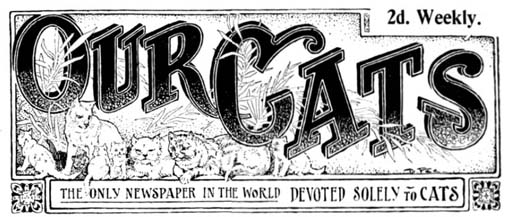
The British Newspaper Archive tells me they have recently digitised a newspaper called Our Cats: “‘The only newspaper in the world solely devoted to cats,’ the first edition of Our Cats appeared on 1 November 1899 in response to the growing cat fancy community. Filled with reports on cat shows and ‘cat personalities of interest,’ readers could write to Our Cats for advice on caring for their feline friends.”
As I think it vanishingly unlikely that any of you have a subscription to the British Newspaper Archive, I will forbear to give a link. I must say, though, that new things are going online now at an amazing pace. More and more, I can sit in my garden plugging away on my laptop and do all sorts of neat original research.
That’s what I do with myself now: research local history. It’s rich pickin’s.
Have a good weekend, everyone!
August 21, 2026 — 6:31 pm
Comments: 5
I got AI to write me an article on AI

The novel-writing AI came across my feed again today and the comments were so depressing. People either wanting to buy in or old hands. They all spoke of it as “my writing.” One person was on the platinum plan and put out 4 books a month.
So I asked Grok what percentage of Kindle Direct Publishing was AI, and this was the answer:
No exact official figure exists from Amazon, as KDP does not publicly release comprehensive stats on AI-generated content across its full catalog. Estimates come from independent studies using AI-detection tools on samples of self-published (mostly KDP) books; these tools are imperfect (with potential false positives/negatives) and often distinguish “substantial” AI text from lighter assistance or none. arxiv.org
New ebook releases overall: An NBER working paper (Reimers & Waldfogel) analyzed detection on a large random sample (>50,000 titles). Detected AI content was near zero through 2022, rose to ~30% of releases in 2023, ~45% in 2024, crossed 50% in 2025, and surpassed 60% by late 2025. This tracks the sharp rise in monthly Amazon ebook releases (roughly tripling from ~100k pre-ChatGPT levels to over 300k by late 2025), much of it attributed to AI officechai.com
2025 publications specifically: Related reporting on detection across tens of thousands of books found ~53% of those published in 2025 contained AI-generated text (vs. ~23% in 2023). nytimes.com
Self-published genre fiction (2023–early 2026 sample): A 2026 study of 14,419 titles (full-text detection via Pangram, matched to sales data through mid-2026) found: Substantial AI text (>25% of the book): 20% – Light AI text (≤25%): 17.1% – No detected AI: 62.9% – Any detected AI text: ~37% overall in the multi-year sample.
The share of sales going to books with any AI text rose over time and approached ~40% by Q2 2026; substantial-AI books also gained top-rank positions (e.g., up to ~31% of new Top-25 entrants in some analyses). These books underperform on a per-title basis but gain market share through volume. arxiv.org
Percentages are often higher in specific categories. Examples include ~77% of recent “Success” self-help books and ~63% of certain religious paperbacks flagged as likely AI (via detection on samples/descriptions). Low-content books (puzzles, coloring, journals, etc.) also see heavy AI use. originality.ai
Amazon allows AI-generated books on KDP (with required disclosure for content AI created from scratch—text, images, or translations — but not purely assisted editing/brainstorming). Disclosure is internal (not shown to readers), and enforcement has increased, with limits such as caps on daily uploads of AI-generated titles. Many books in the studies did not disclose, so detection is the primary measurement method. builtwritten.com
In short: For recent new releases on KDP/Amazon ebooks, credible detection-based estimates put AI-involved content in the roughly 50–60%+ range by late 2025, with lower overall shares in multi-year fiction samples and higher rates in some nonfiction niches. The total catalog (including older titles) would have a lower percentage. Figures continue to evolve with tool improvements and market changes.
And just to cap my anti-AI hypocrisy, I asked it to create an illustration to go with.
August 20, 2026 — 7:20 pm
Comments: 8
How much of this are we seeing already?
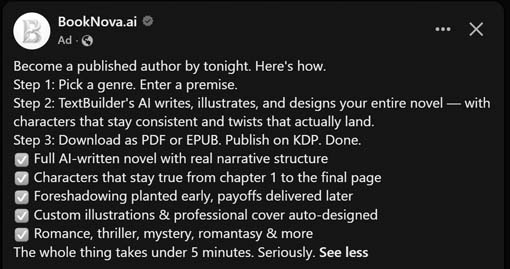
Can you read that? It says:
Become a published author by tonight. Here’s how.
Step 1: Pick a genre. Enter a premise.Step 2: TextBuilder’s AI writes, illustrates, and designs your entire novel — with characters that stay consistent and twists that actually land.
Step 3: Download as PDF or EPUB. Publish on KDP. Done. Full AI-written novel with real narrative structure
Characters that stay true from chapter 1 to the final page
Foreshadowing planted early, payoffs delivered later
Custom illustrations & professional cover auto-designed
Romance, thriller, mystery, romantasy & moreThe whole thing takes under 5 minutes. Seriously.
If you head over to booknova.ai, you learn
Our AI will find a killer book title for your genre
Our AI will build your characters — voices, arcs, and motivations
Our AI will map every plot thread from setup to payoff
Our AI will write every chapter — scenes, dialogue, and tension
Our AI will generate chapter illustrations and character art
Our AI will design a genre-perfect cover for you
Our AI will deliver a 100% publish-ready novel for KDP
You pay a one time flat fee and get X number of credits, rolled over every month. The beginner plan is £49 and gives you 50,000 credits. 1 credit = 1 word and the average novel is 60-100,000 words. The largest plan is £309 for 400,000 credits a month. They’re selling a limited number of seats at each category (why?). Grok tells me Higher “SCALE” plans (1M+ credits/month) exist for very high-volume users (contact them).
The end result can be injected straight into Kindle Digital Publishing.
Five. Minutes.
How much of this stuff is already in the bloodstream?
August 19, 2026 — 4:23 pm
Comments: 8
Expect to see a lot more of this
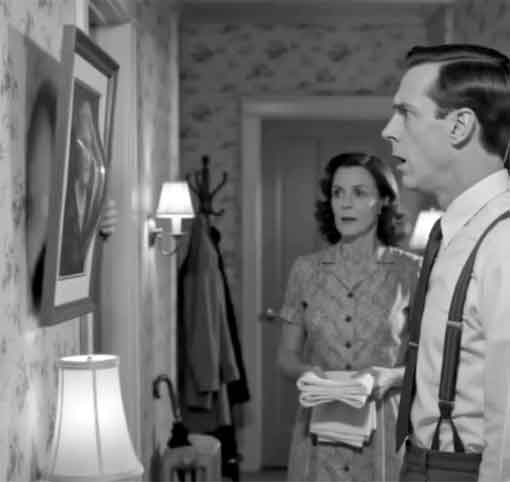
The still is from a Facebook channel called The Holloway Archives. The About section is blank. Unclear if it’s related to the YouTube channel of the same name.
It posts short reels, in a 1950s black and white TV retro style, with highly surreal content. Obviously AI generated, with recurring characters and themes. A hallmark of the style is that characters often look alarmed or frightened, particularly men.
Why this first came across my feed I do not know. I watched a bunch of them and was entertained.
It’s kind of like the potato chips of content, though. Amusing but not very filling. I predict people will get tired of this pretty quick, unless it’s strung together more artfully and in longer clips.
August 18, 2026 — 6:02 pm
Comments: none